Start Here
This page is for people who want to understand the Goldenpond language itself.
Goldenpond has two main parts:
- a chord language for describing harmonic movement in a compact, musically meaningful way
- a rhythm language for extracting riffs, arpeggios, and note patterns from those chords
Chord Language
Basic chord progressions are represented as a list of numbers for the degree of the scale.
For example, 1,5,6,4 is the classic 1-5-6-4 four-chord pop loop.
The chord language is always interpreted with the assumption of a key signature that tells it the root note and mode. Ie. whether we are in C major, A flat minor and so on. The actual notes of the chord are calculated from the chord numbers plus this contextual information.
Note that Goldenpond currently supports major, minor (the "natural minor"), harmonic minor and melodic minor.
Extended chords are created by adding the digits 6, 7, or 9 to the front. So 74 is the seventh chord built on the fourth degree, and 92 is the ninth chord built on the second degree. Don't panic! This is easier to use than it is to explain. When you start just playing around with these numbers in a progression, you'll find it's easy.
Chord inversions are added with i suffixes. For example, 6ii is the second inversion of the 6 chord. This composes with the extension notation, so 73i means the first inversion of the seventh chord built on the third degree. (Within the current key context)
Alternative scales and modes can be selected explicitly. Goldenpond can work in Major, Natural Minor, Harmonic Minor, and Melodic Minor. You can switch to a new mode at any point during a progression by using !M, !m, !hm, or !mm. For example, 1,3,!hm,2,5 switches to harmonic minor for the final part of the progression.
Modal interchange lets you borrow chords from other modes of the current scale. We write (d!m) to mean the chord on degree d from mode m of the current scale. For example, if we are in major, (2!3) means the second-degree chord from the third mode, phrygian. (6!5) means the 6 chord from the fifth mode, mixolydian.
Modal chords also compose with the other modifiers, so 7(4!4)i gives the first inversion of the seventh chord built on the fourth degree of the fourth mode, lydian.
Secondary chords temporarily tonicize another degree of the current scale. (5/3) is the secondary dominant: the 5 chord of the key where the current 3 chord is tonic. So (5/3),3 gives a strong resolution into the 3 chord. You can use more unusual combinations too, such as (2/4),4.
This notation also composes with extensions and inversions. For example, 7(6/3)i is the first inversion of the seventh chord on the sixth degree of the scale where the 3 chord is tonic.
At the moment, secondary chords do not compose with modal interchange chords.
Transposition uses a special notation in place of a chord. >n and <n tell the sequence to transpose up or down n semitones from that point onward.
For example, 1,4,3,>1,6,4,5 in C major plays the first part in C major, then transposes upward by one semitone and continues in C# major.
In looping environments, the sequence is usually generated once and then repeated by the host. So when the loop returns to the beginning, it typically returns to the original key.
Here's a brief example. It starts in the minor, shifts to major at one point. Transposes downwards and back up, and uses both secondary dominants and borrowings from other modes
Rhythm Language
The rhythm language is a simple way to extract notes from chords.
It consists of a pattern of note selectors and rests, followed by a space and then a density.
For example:
1.1. 2
This is a four-step pattern. On steps 1 and 3 it plays the first note of the current chord, usually the root. Because the density is 2, that four-step pattern repeats twice over the duration of each chord.
Patterns do not need to be regular powers of two. A seven-step pattern such as:
1.2..3. 1
will produce a more asymmetrical riff.
Because Goldenpond does not assume a chord consists of a fixed number of notes, you can also define arpeggios with > and <, meaning "move up" and "move down" through the chord tones.
Examples:
>.>.>.>.gives an upward arpeggio2.>.<...plays the second note, then the next note up, then the previous note down
Other important selectors:
tselects the top note of the chordrselects a random note from the chord=repeats the previously selected notecplays the entire chord (ie. all the notes from the chord) in a single stepbplays the same chord as thecoption, but with an extra bass note (the root of the chord) an octave lower.dplays the chord in "drop-2" spelling. It takes the second highest note of a seventh, and brings it down an octave. For example, C-Major7 is CEGB. The drop-2 version will play the G an octave lower.Rplays a random note from the whole 7 note scale, not the the chord. This can give a richer melodic sound, but can also create clashes so use with care.
Euclidean Rhythms
The rhythm language also supports the Euclidean rhythm algorithm as shorthand. This uses two numbers, k/n, followed by a note selector, followed by density.
For example:
3/8 < 2
This means:
- use the Euclidean rhythm with 3 notes across 8 steps
- select notes using the downward arpeggio selector
< - repeat the whole pattern twice over the duration of the chord
If you want to offset the starting position in the Euclidean pattern, use +n:
3/8+2 1
Each musical line can have its own rhythm-language pattern, so one progression can generate several contrasting parts at once.
Euclidean Rhythms for real this time
In fact the slash notation for Euclidean rhythms is NOT strictly the Euclidean rhythm algorithm. It tries to do the same thing - spread k hits over n steps as evenly as possible. And it gives pleasing results. But it's not the Euclidean algorithm itself (some of the hits end up in different places). We use the % to get a real Euclidean rhythm. Eg 3%8 r 1 will gives us random notes from the chord on 3 out of 8 steps according to the real Euclidean algorithm. Much of the time n/k and n%k will give you the same result. Occasionally they don't. We decided we quite like the results of the / notation and wanted to keep it. It's fine musically. But for purists, there's the % notation.
Chord Density
Chord density refers to the number of times a pattern is repeated within a chord.
For example,
1..> 2
means that the pattern occurs twice within the chord. The 2 is the "chord density".
However, we now allow for fraction or "ratio" densities. For example
1..>>> 1/2
this means that the pattern is actually twice as long as the chord. In other words this rhythmic pattern is spread across two chords. This can add a lot more interest to the lines generated with Goldenpond, as the boundaries of patterns are no longer constrained to be within the boundaries of chords.
Eg.
In Signal

There's a Goldenpond tabbed panel below the piano roll.
Unfortunately Signal doesn't support vertical scrolling, so you may need to drag the divider between the piano roll and the panels up to make room to see the whole Goldenpond panel. (See image above).
You can type a chord progression into the Chord Sequence box, add rhythm-language snippets for the individual lines, (there are four lines available which correspond to the four first tracks in the sequencer) And then generate notes with the Generate button.
You can set the sequencer playing in a loop and keep updating the chord progression to explore. And one useful thing about the Signal sequences is you can then add more tracks with your own instrument parts to add specific melodies on top of the chords.
In Strudel
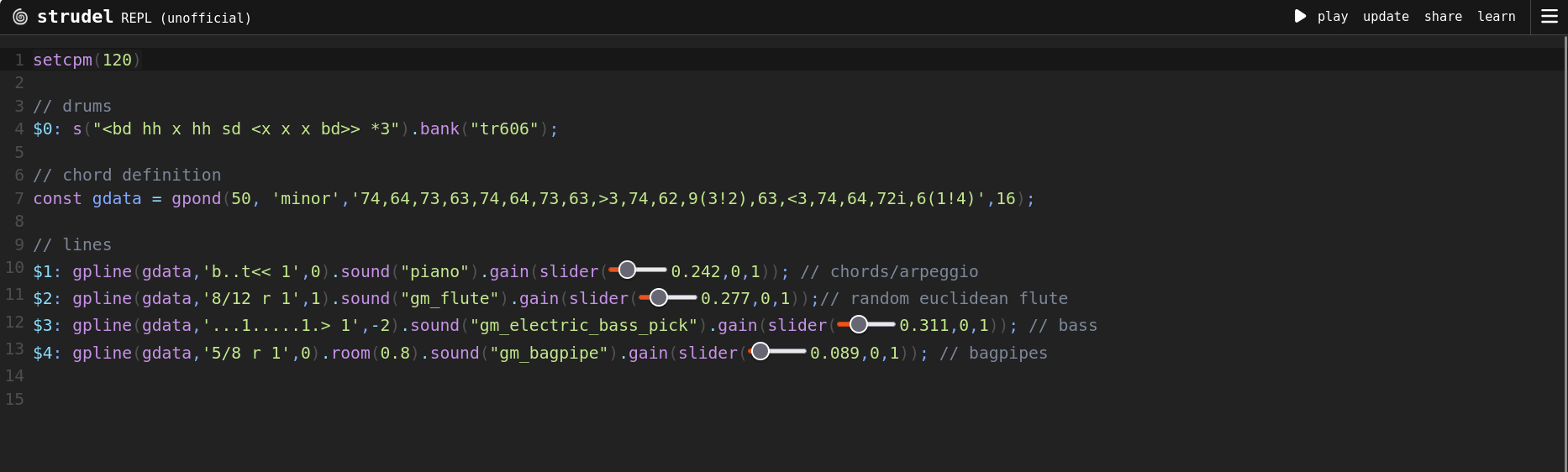
Two new functions have been added to Strudel :
gpond() takes as arguments the root note, the mode ("major","minor","melodic minor","harmonic minor"), the actual chord progression in the Goldenpond chord language. And finally the number of Strudel "cycles" that each chord takes up. It returns a GoldenData object ie. and object with all information about the chord progression, that we need to generate the lines.
gpline() takes the golden data object, the rhythm language string, and an octave offset. And generates a Strudel pattern of notes which can be treated just as any other note pattern within Strudel.
For example :
setcpm(120)

// drums
$0: s("<bd hh x hh sd <x x x bd>> *3").bank("tr606");

// chord definition
const gdata = gpond(50, 'minor','74,64,73,63,74,64,73,63,>3,74,62,9(3!2),63,<3,74,64,72i,6(1!4)',16);

// lines
$1: gpline(gdata,'b..t<< 1',0).sound("piano").gain(slider(0.424,0,1)); // chords/arpeggio
$2: gpline(gdata,'9/12 r 1',1).sound("gm_flute").gain(slider(0.564,0,1));// random euclidean flute
$3: gpline(gdata,'...1.....1.> 1',-2).sound("gm_electric_bass_pick").gain(slider(0.777,0,1)); // bass
This will create the chord progression. And three Strudel patterns. A piano playing the chord then a downward arpeggio. A flute playing random notes from the chords in a "euclidean" rhythm, and a bassline.
Be careful that you should put the chord and rhythm language strings in single quotes. Otherwise Strudel will try to interpret them as Strudel patterns.